
Control Flow in JavaScript:
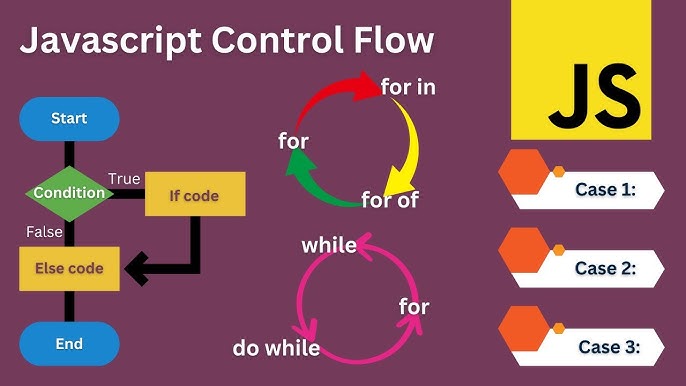
Introduction :
When we write programs, sometimes we need the computer to make decisions. For example:
If it is raining → take an umbrella
If marks are above 90 → give grade A
To handle these situations, JavaScript uses control statements.
Control statements control the flow of the program based on conditions.
The main control statements are:
ifif-elseelse if ladderswitchbreakternary operator
Let’s understand them one by one.
1. If Statement :
The if statement checks a condition and if the condition is true , the code inside that condition will run .
Syntax
if(condition){
   // code to execute
}
Example
let age = 18;

if(age >= 18){
   console.log("You can vote");
}
Output
You can vote
2. If else Statement :
Sometimes we want two possibilities.
If condition is true → run first block
Otherwise → run second block
Syntax
if(condition){
   // code if true
}
else{
   // code if false
}
Example
let age = 17;

if(age >= 18){
   console.log("You can vote");
}
else{
   console.log("You cannot vote");
}
Output
You cannot vote
3. Else If Ladder :
Sometimes we have many conditions.
Example:
marks ≥ 90 → Grade A
marks ≥ 75 → Grade B
marks ≥ 50 → Grade C
else → Fail
Syntax
if(condition1){
   // code
}
else if(condition2){
   // code
}
else if(condition3){
   // code
}
else{
   // default code
}
Example
let marks = 82;

if(marks >= 90){
   console.log("Grade A");
}
else if(marks >= 75){
   console.log("Grade B");
}
else if(marks >= 50){
   console.log("Grade C");
}
else{
   console.log("Fail");
}
Output
Grade B
4. Switch Statement :
When we have many fixed values, using multiple if-else becomes messy.
In such cases we use switch statement.
Syntax
switch(expression){
   case value1:
      // code
      break;

   case value2:
      // code
      break;

   default:
      // code
}
Example 1 (Number Case):
let day = 3;

switch(day){
   case 1:
      console.log("Monday");
      break;

   case 2:
      console.log("Tuesday");
      break;

   case 3:
      console.log("Wednesday");
      break;

   default:
      console.log("Invalid day");
}
Output
Wednesday
Example 2 (Chracter Case):
Yes, switch can also take characters or strings.
let grade = 'A';

switch(grade){
   case 'A':
      console.log("Excellent");
      break;

   case 'B':
      console.log("Good");
      break;

   case 'C':
      console.log("Average");
      break;

   default:
      console.log("Fail");
}
Output
Excellent
So, case values can be:
numbers
characters
strings
5. Break Statement :
The break statement stops the switch after the correct case executes.
Without break, JavaScript continues executing the next cases.
Example Without Break
let day = 1;

switch(day){
   case 1:
      console.log("Monday");

   case 2:
      console.log("Tuesday");

   case 3:
      console.log("Wednesday");
}
Output
Monday
Tuesday
Wednesday
Because there is no break, execution continues.
6. Ternary Operator :
The ternary operator is a short form of if-else.
Syntax
(condition) ? true : false;
Example
let age = 20;

let result = (age >= 18) ? "Adult" : "Minor";

console.log(result);
Output
Adult
Instead of writing:
if(age >= 18){
 result = "Adult"
}
else{
 result = "Minor"
}
We write in one line.
When to use switch v/s else-if ?
Use if-else when:
conditions involve ranges
complex conditions exist
logical operators are used (
&&,||)
Example:
if(marks > 80)
Use switch when:
checking one variable
comparing exact values
many options exist
Example:
switch(day)
Memory / Flow Understanding :
Control statements do not change memory automatically.
But they decide which code runs.
Example:
let x = 10;

if(x > 5){
   x = 20;
}
Here:
xinitially stores 10 in memoryCondition checks
If true → value becomes 20
So memory changes only when assignment happens.
SUMMARY:
| Statement | Use |
|---|---|
| if | single condition |
| if-else | two possibilities |
| else-if ladder | multiple conditions |
| switch | fixed value comparison |
| break | stop switch execution |
| ternary operator | short if-else |
Final Analogy :-
Think of control statements like traffic signals:
if→ check road conditionif-else→ two directionselse-if→ multiple pathsswitch→ choose exact routebreak→ stop further movementternary→ quick decision shortcut
They control how the program moves step by step.
So, this is all about control flow .Thank you for reading this blog . I am open to feedback and suggestions.


